
Payment Methods
Fast deposits, quick withdrawals, and secure checkout options.










BPExch Wallet App Download & Installation Steps
Our bpexch wallet app is available as an APK download for Android users in Pakistan. Follow the steps below to install the app securely and begin managing your funds. The process takes just a few minutes once you’ve enabled the necessary permissions on your device.
Android APK Download Steps
- Visit the official BPExch website and navigate to the ‘Download App’ section.
- Tap the bpexch wallet app download link. The APK file is typically under 50 MB.
- Enable ‘Install from unknown sources’ in your Android settings (Security or Privacy section).
- Open the downloaded file and tap ‘Install’ to complete the bpexch wallet download.
Installation Troubleshooting
- Insufficient storage: Clear cache or delete unused apps to free up space.
- Installation blocked: Verify ‘Unknown sources’ is enabled in your device settings.
- Still facing issues? Contact our WhatsApp support for immediate assistance.
After installation, complete CNIC verification (KYC) through the bpexch wallet before you can process withdrawals.
BPExch Wallet Login & Account Recovery
Access your bpexch wallet securely through our mobile-optimised platform. We’ve built a streamlined login process with OTP verification to protect your funds and personal data at every session.
How to Log In to Your Account
- Open the BPExch site or app and tap the bpexch wallet login button
- Enter your registered mobile number and password
- Verify the OTP sent to your mobile
- Access your dashboard—all sessions are protected with 256-bit SSL encryption
Password Reset & OTP Issues
Forgotten your password? Tap Forgot Password, enter your mobile number, verify the OTP, and set a new password immediately.
If your OTP does not arrive:
- Wait 60 seconds and request a new code
- Check your mobile network signal
- Kindly contact our WhatsApp Agent Network for instant assistance
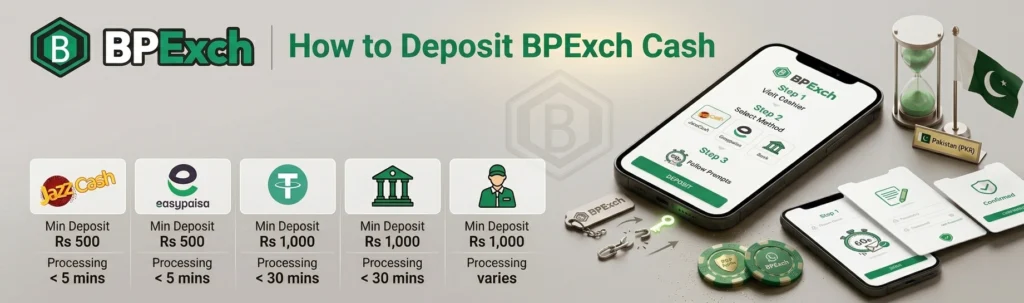
How to Add BPExch Cash via Local Payment Methods
We support multiple deposit channels to help you fund your bpexch wallet quickly and securely. Whether you prefer mobile wallets, bank transfers, or cryptocurrency, our platform accepts all major Pakistani payment methods with competitive minimums and fast processing.
Accepted Deposit Methods & Limits
Choose the payment option that works best for you:
Method | Min Deposit | Processing Time |
|---|---|---|
JazzCash | Rs 500 | Typically instant |
Easypaisa | Rs 500 | Typically instant |
IBFT/RAAST | Rs 1,000 | Up to 30 minutes |
USDT Crypto | Rs 1,000 equivalent | Typically 10–15 minutes |
Fees & Processing Notes
We charge zero platform fees on all deposits to your bpexch wallet. Once your bpexch cash is credited, you can start playing immediately. For bpexch live withdrawal, processing typically completes within a few hours, though first-time requests may require additional verification.
BPExch Wallet Withdrawal Process & Timelines
Once you’ve met all wagering requirements, withdrawing your bpexch cash is straightforward. We support multiple local payment methods with clear limits and typically process requests within our six-hour payout window. First-time withdrawals require CNIC verification to ensure account security.
How to Request a BPExch Wallet Withdrawal
- Log in and navigate to the Cashier section
- Select ‘Withdrawal’ and choose your preferred payout method
- Enter the PKR amount and upload your CNIC (required for first-time requests)
- Confirm the transaction details
Requests are typically processed within 6 hours.
Withdrawal Limits & Supported Methods
Method | Min (PKR) | Max (PKR) |
|---|---|---|
Local Bank Transfer | Rs 1,000 | Rs 10 lakh |
JazzCash / Easypaisa | Rs 500 | Rs 2 lakh |
Crypto (USDT) | Rs 2,000 | Rs 25 lakh |
Any active bonus rollover requirement must be cleared before bpexch withdrawal is approved. Check the Cashier page for current limits.
Setting Personal Withdrawal Limits
We offer responsible gaming tools that let you set daily or weekly withdrawal caps through your Account Settings. Use these features to manage your gaming activity according to your personal budget.
Bonus Rollover & Wagering Before Withdrawal
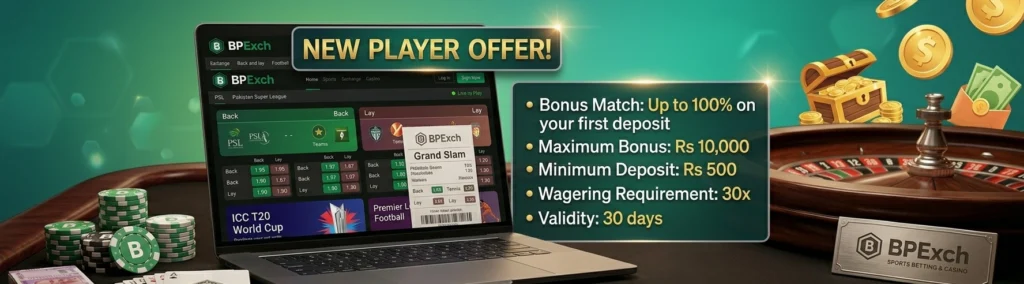
Any bonus credited to your bpexch wallet carries a wagering requirement that must be completed before you can withdraw. We display rollover conditions clearly so you know exactly what’s needed to unlock your funds.
How Wagering Requirements Work
Each bonus includes a rollover multiplier—typically shown on our Promotions page—that determines how much you must wager before requesting a withdrawal. Until the requirement is met, your withdrawal option remains locked to ensure fair play.
Check Remaining Rollover in Your Wallet
Track your progress directly in the wallet app:
- Open your bpexch wallet app and navigate to the Bonus or Account section
- View your remaining rollover balance; once it reaches zero, withdrawal becomes available
We update rollover status in real time so you always know where you stand before submitting any withdrawal request.
Security & Account Safety Tips
We protect your bpexch wallet with 256-bit SSL encryption, but your vigilance adds an extra layer of safety. Follow these quick tips to keep your account secure and your funds protected at all times.
Password & Session Safety
- Use a strong, unique password – combine letters, numbers, and symbols, and avoid reusing passwords from other platforms.
- Log out after each session – especially on shared or public devices to prevent unauthorized access to your bpexch wallet.
Report Suspicious Activity
If you notice unauthorized login attempts or unusual transactions, contact us immediately via WhatsApp or live chat. Our support team will investigate and secure your account within minutes to protect your funds.